Download document () of 20
 Send email
Download
You have exceeded the download limit

A charging station is a cabinet that can house and charge dozens of devices at one time. To ensure all devices are protected, the best charging stations are made of steel and have lockable doors.
Laptop/notebook computers, Chromebooks and tablets are ubiquitous in schools, healthcare facilities, government offices and businesses of all types. While it's important to keep all these devices charged, synced and ready for use, it's equally important to ensure they remain safe, secure and organized while they charge. The charging station was developed to meet these needs and help you manage your mobile devices.
Charging stations typically include:
Most high-quality charging stations are constructed from durable steel and include ventilation systems to prevent overheating while devices charge.
Charging stations help organizations manage dozens of devices while keeping them organized, protected and ready for use.
A charging station helps protect your devices. Considering the cost to outfit the average 25-student classroom with Chromebooks could range from $7500 to $10,000 or more, it makes budgetary sense to outfit each classroom with a Chromebook charging station to protect those devices. For added security, most Eaton models can be tethered to an immovable object using a chain or bicycle lock to ensure the charging station itself is not removed.
A charging station helps protect your data. For healthcare facilities, government offices and businesses, a lockable charging station keeps the devices themselves safe, while helping to ensure sensitive and proprietary data stored on the devices or accessible by the devices remains secure when the devices are charging or stored.
Charging stations improve device organization. Charging stations keep devices neatly organized in individual compartments, preventing damage caused by tangled cables or stacked devices. Built-in cable management systems also keep charging adapters and cables hidden from view, creating a clean and clutter-free setup.
One of the most important decisions when purchasing a charging solution is determining whether you need a stationary charging station or a mobile charging cart.
Stationary charging stations are typically mounted to a desk, countertop, wall or floor. They are ideal for environments where devices remain in a fixed location, such as:
Stationary charging stations provide a centralized location where users can store and charge devices safely.
A mobile charging cart allows devices to be transported between rooms or departments. Charging carts include swivel casters and handles for easy mobility.
They are commonly used in:
Mobile carts make it easier to deploy and collect devices across multiple locations.
| Charging Station Model | Cart Conversion Kit |
| CS16AC | CSHANDLEKIT |
| CS16USBWHG | CSHANDLEKIT2 |
| CS32AC | CSHANDLEKIT |
| CS48USB | CSHANDLEKIT |
| CS48USBW | CSHANDLEKIT |
| CSC16AC | CSHANDLEKIT2 |
| CSC16ACW | CSHANDLEKIT2 |
| CSC16USB | CSHANDLEKIT2 |
Charging stations typically support USB charging or AC outlet charging, depending on the devices being used.
USB charging stations are designed for devices that charge through a USB cable. Common compatible devices include:
USB charging stations typically include 16, 32 or 48 USB ports and provide up to 2.4 amps of charging power per port.
USB charging carts may also support wired syncing, allowing administrators to update software, back up data or restore standard device configurations.
AC charging stations include standard electrical outlets for charging devices using their original power adapters. These are best suited for:
AC charging stations can also charge tablets and smartphones when their original adapters are used.
Built-in cable management systems keep power adapters and cords organized and prevent tangled cables.
Some charging carts include timers and charging zones that alternate power between device groups to avoid overloads. LED indicators often show which zone is currently charging.
Lockable doors help prevent unauthorized access and deter device theft. Some models also include padlock hasps and cable lock ports for additional security.
Steel charging stations provide better durability and improved ventilation compared to wood cabinets. This helps keep devices cool during charging.
Charging multiple devices generates heat. Look for models with mesh panels or ventilation openings to maintain airflow and prevent overheating.
For mobile carts, large non-marking swivel casters improve maneuverability and prevent damage to floors. Locking casters keep the cart securely in place during use.
Cord wraps keep power cords neatly stored when carts are moved or unplugged. This prevents tripping hazards and keeps the cart organized.
Some charging carts include a flat work surface, allowing the cart to function as a mobile presentation station or workstation.
Certain charging carts are designed for high-use environments such as hospitals, schools, retail environments and shared-device workplaces where device hygiene is critical.
UVC light can help reduce microorganisms on device surfaces by disrupting their DNA and preventing replication.
Antimicrobial coatings with silver-ion technology help inhibit the growth of bacteria, mold and fungi on high-touch surfaces such as handles.
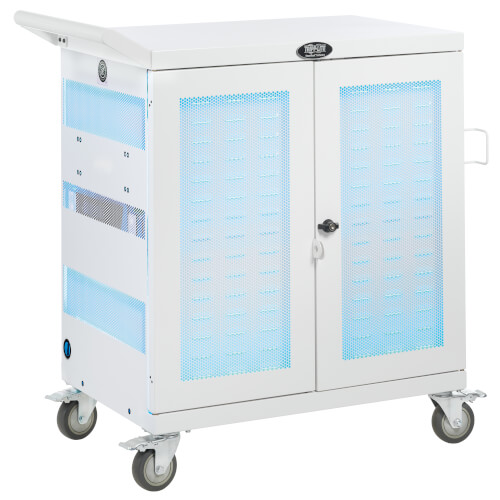
In addition to traditional charging carts and cabinets, other device charging solutions are available.
Charging towers provide secure storage and charging for up to 20 devices in a compact vertical design. These are useful for small classrooms or crowded rooms.
Desktop charging stations support up to 10 devices and provide charging, cord management and secure storage in a compact format. Some models include locking lids for additional security.
Rack-mount charging stations allow devices to be charged within standard IT rack environments using AC or USB ports.
Explore Eaton’s full selection of charging carts, charging stations and multi-device charging solutions designed for education, healthcare and enterprise environments.
We know you have many brands to choose from. On the surface, they may all seem alike. It's what you don't see that makes the difference. With Eaton, you get solid engineering, proven reliability and exceptional customer service. All our products undergo rigorous quality control before they are offered for sale, and independent testing agencies verify our products meet or exceed the latest safety and performance standards. Our commitment to quality allows us to back our products with industry-leading warranties and responsive customer service. It's the Eaton difference.

 MyEatonFAQs


